Article Summary: This article explains what IP history is, how DNS A-record observations are collected to build a historical record, why domains change IP addresses, and how IP history data is used for domain research, migration verification, and security investigation. It covers the key differences between IP history and WHOIS history, and answers common questions about the tool's database and scope.
What Is IP History?
IP history — also referred to as DNS history or A-record history — is a chronological record of every IP address a domain name has resolved to over time. Where a standard DNS lookup shows you where a domain points right now, IP history shows you where it has pointed in the past, when it changed, and how many times it has changed.
Every IP address a domain resolves to is stored in its DNS A record. When a website moves to a new server, migrates to a CDN, or responds to a security incident, its A record is updated to point to a new IP. Without a historical record of those changes, this information is gone the moment the DNS TTL expires and caches refresh. IP history tools preserve this DNS timeline, giving researchers and administrators a permanent record of a domain's infrastructure evolution.
This tool builds its IP history database from first-party DNS observations — every time a domain is queried on IP DNS Hub, its current IP is recorded with a timestamp. The result is a growing, accurate IP change tracking dataset that reflects real DNS resolution rather than inferred or archived data.
How It Works
First-Seen and Last-Seen Timestamps
For each unique IP address observed for a domain, the database stores two timestamps: first seen (the date and time the IP was first recorded resolving for that domain) and last seen (the most recent time the same IP was observed). An IP with a last-seen date more than 7 days ago is considered historical — the domain has likely moved away from it. An IP seen within the last 7 days is flagged as current.
This first seen / last seen model provides an approximate timeline of when each server migration or IP change occurred, accurate to within the observation frequency — typically within days of the actual DNS change for actively monitored domains.
How the Database Grows
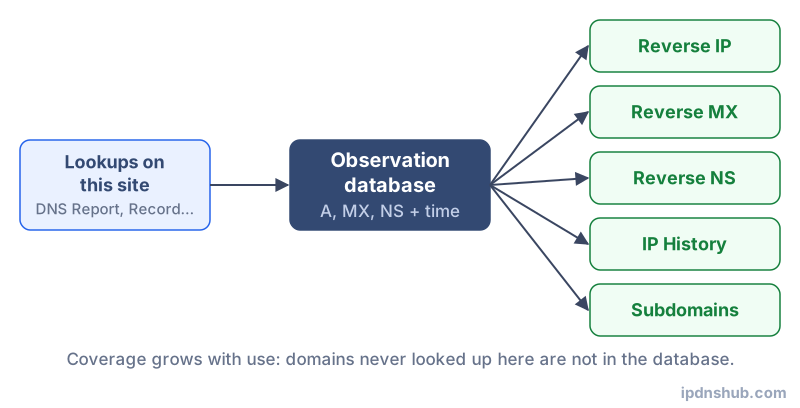
The IP history database is built organically. Each tool on IP DNS Hub — the DNS Report, DNS Record Lookup, Reverse IP Lookup, and others — resolves the queried domain's A record and stores the result. The more frequently a domain is queried, the richer its history becomes. Domains queried for the first time start building their history from that point forward.
Common Use Cases
Server Migration Verification
After migrating a website to a new server or hosting provider, IP history confirms that the old IP is no longer active and the new IP has been correctly propagated globally. A domain still showing its old IP in the history with a recent last-seen date may indicate DNS propagation is still in progress or that some resolvers are still serving cached answers.
CDN Migration Detection
When a domain adopts a CDN like Cloudflare, Fastly, or Akamai, its A records change from a single origin IP to one of the CDN's anycast IP ranges. This transition is clearly visible in IP history — the original hosting IP disappears and is replaced by CDN-owned IPs. Conversely, a domain that has removed CDN protection reverts to an origin IP, which may also be a security concern (exposing the true origin server).
Security Incident Investigation
Security researchers use DNS history to investigate domain hijacking, DNS poisoning, and phishing infrastructure. A domain that briefly resolved to an unexpected IP — particularly one associated with known malicious actors — may have been compromised. IP history provides the evidence trail needed to establish when the compromise occurred and how long it lasted.
Domain Acquisition Due Diligence
Before acquiring a domain, checking its IP history reveals whether it has been hosted on known spam servers, bulletproof hosting providers, or IP ranges associated with malware distribution. A domain's past hosting environment affects its email reputation and may indicate a history of abuse that continues to affect its standing with spam filters and search engines.
Technical Reference
| Reason for IP Change | Frequency | Impact on SEO / Deliverability |
|---|---|---|
| Server migration | Occasional (every few years) | Minimal if done with proper TTL reduction and overlap period |
| CDN adoption | Once (then stable) | Positive — improves performance and hides origin IP |
| Host provider change | Occasional | Neutral if new provider has clean IP reputation |
| DDoS mitigation | Emergency-driven | Neutral to positive — moves to scrubbing center IPs |
| Security incident response | Rare but high-urgency | Critical — rapid IP change may leave DNS cached for hours |
| Load balancer rotation | Frequent (may change per query) | Neutral — multiple IPs are expected for high-traffic domains |
Frequently Asked Questions
How far back does IP history go?
The database records IP history from the first time a domain was queried on IP DNS Hub. There is no fixed historical depth — a domain that was first queried a week ago will have one week of history, while a domain queried from the site's launch will have a longer record. The database does not import historical archives from third parties; all data is first-party observed.
Why would I want to see a domain's IP history?
IP history answers questions that current DNS data cannot: Has this domain ever been hosted on a suspicious server? When did it move to Cloudflare? Did the IP change recently in a way that suggests a migration is still in progress? How many times has it changed hosts in the past year? This context is valuable for domain due diligence, security research, and infrastructure auditing.
How is this different from WHOIS history?
WHOIS history tracks registrar-level changes — who owned the domain, when it was registered and transferred, and how contact information changed over time. IP history tracks DNS A-record changes — which IP addresses the domain actually resolved to. They answer different questions. WHOIS history reveals ownership changes; IP history reveals infrastructure changes.
Can I see when a domain moved to Cloudflare?
Yes — if the domain was queried on IP DNS Hub both before and after its Cloudflare migration, the IP history will show the transition from an origin hosting IP to one of Cloudflare's well-known anycast IP ranges (such as the 104.x.x.x or 172.x.x.x blocks). The first seen date of the Cloudflare IP identifies when the migration was first observed.
Why is my domain not in the database?
If a domain has never been queried through any IP DNS Hub tool, it will not appear in the IP history database. To start building history for a domain, run a DNS Report or any DNS record lookup for it. The domain's current IP will be recorded immediately and will appear in IP history from that point forward.
Conclusion and Takeaways
IP history provides a dimension of domain intelligence that current DNS lookups cannot offer: a timeline of infrastructure changes. Whether you are verifying a server migration, investigating a security incident, auditing a domain before acquisition, or simply understanding how a website's hosting has evolved, the IP history tool delivers accurate, first-party observed data with timestamps. The database grows with every query made on IP DNS Hub, making it increasingly comprehensive over time.
Ready to Check?
Use IP History above — no login required, instant results.