Article Summary: This article explains what nameservers and NS records are, how a reverse NS lookup works, and what practical intelligence it provides about domain portfolios, DNS hosting patterns, and shared infrastructure. It also covers common use cases ranging from competitive research to security auditing.
What Is Reverse NS Lookup?
In standard DNS, an NS record (Name Server record) specifies which authoritative nameservers are responsible for a domain's zone. A forward NS lookup asks: "What nameservers does example.com use?" and returns answers like ns1.cloudflare.com and ns2.cloudflare.com. A Reverse NS Lookup inverts this query: given a nameserver hostname, it returns a list of all domains that have that nameserver listed in their NS records.
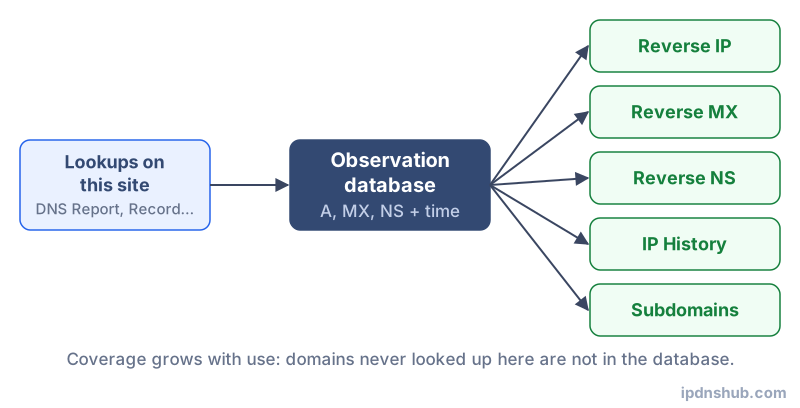
This is not a native DNS query type — the DNS protocol has no built-in mechanism for this kind of reverse lookup. Instead, it requires a database of observed NS records built by querying many domains over time and indexing their nameserver relationships. IP DNS Hub builds and grows this database from DNS queries made through its tools, making the reverse NS lookup results increasingly comprehensive over time.
How It Works
NS Records and Zone Delegation
When a domain is registered, it must be delegated to at least two authoritative nameservers. This delegation is represented by NS records both in the parent zone (e.g., the .com registry's zone) and in the domain's own zone. The NS records tell the global DNS system which servers hold the definitive, authoritative answers for all DNS queries about that domain. Every DNS hosting provider — Cloudflare, AWS Route 53, Google Cloud DNS, Namecheap, GoDaddy, and thousands of others — has its own set of nameserver hostnames that identify its infrastructure.
Building the Reverse Index
Each time a domain's DNS records are looked up through IP DNS Hub, the NS records are retrieved and stored. The nameserver hostnames are extracted and used as index keys, with the queried domain recorded as a value. Over time, this creates a growing reverse index: a map from each nameserver hostname to the set of domains observed using it. When you perform a Reverse NS Lookup, this index is queried directly, returning all matching domains from the accumulated dataset.
Shared Nameserver Infrastructure
Most domains do not run their own nameservers. Instead, they use the shared nameserver infrastructure of a DNS hosting provider. Cloudflare, for example, assigns each customer a pair of randomly named nameservers (such as aiden.ns.cloudflare.com and aria.ns.cloudflare.com), but many providers use the same nameserver hostnames across all customers. Reverse NS lookup exploits this shared infrastructure to surface domain groupings that would otherwise be invisible.
Common Use Cases
Discovering a Domain Portfolio
Finding All Domains Owned by the Same Operator
Organizations that manage multiple domains often use the same DNS hosting provider and, by extension, the same nameservers across their entire portfolio. A reverse NS lookup on a known nameserver can reveal other domains in the same portfolio, providing insight into the full scope of an organization's online presence. This is especially useful in mergers and acquisitions, due diligence investigations, and brand protection audits.
Identifying Shared Hosting Environments
Mapping DNS Infrastructure
Web hosting resellers and managed DNS providers often configure dozens or hundreds of customer domains to use the same nameserver hostnames. Reverse NS lookup reveals which domains share a given nameserver, making it possible to map out DNS hosting clusters. Security researchers use this to understand blast radius — if a nameserver or DNS provider experiences an outage or is compromised, which domains are affected?
Competitive and Market Intelligence
Understanding DNS Hosting Adoption
Marketers and technology analysts use reverse NS lookup to gauge the adoption of DNS hosting providers within specific industries or among specific sets of competitors. If a known competitor's nameserver is identified, a reverse lookup may surface related brands, regional subsidiaries, or product domains that are not publicly listed anywhere.
Security and Threat Intelligence
Tracking Malicious Infrastructure
Threat actors sometimes register multiple domains on the same nameserver as part of a phishing campaign, spam operation, or malware distribution network. By identifying a suspicious domain and performing a reverse NS lookup, security analysts can quickly surface other domains that share the same DNS infrastructure, often revealing the full scope of a campaign.
Technical Reference
| Provider | Example Nameserver | Domains Hosted |
|---|---|---|
| Cloudflare | aiden.ns.cloudflare.com | Tens of millions (largest DNS host globally) |
| AWS Route 53 | ns-1234.awsdns-12.com | Millions; each hosted zone gets unique NS set |
| Google Cloud DNS | ns-cloud-a1.googledomains.com | Large enterprise and GCP workload deployments |
| Namecheap | dns1.registrar-servers.com | Millions of domains via their registrar platform |
| GoDaddy | ns1.domaincontrol.com | One of the largest registrar/DNS host combinations |
| name.com | ns1.name.com | Registrar-level DNS for domains registered at name.com |
Frequently Asked Questions
What is a nameserver?
A nameserver (name server) is a DNS server that holds the authoritative records for one or more domain zones. When a resolver needs to look up a record for a domain, it ultimately reaches the domain's authoritative nameserver to get the final answer. Nameservers are identified in a domain's NS records and in the delegation records at the parent registry. Every domain must have at least two nameservers for redundancy. Nameservers can be operated by the domain owner (self-hosted), by a DNS hosting provider (such as Cloudflare or Route 53), or by the domain registrar.
Why would I want to find all domains on a nameserver?
There are several professional reasons. Security researchers use it to identify connected domains in a threat actor's infrastructure. Due diligence analysts use it to discover the full domain portfolio of a company being acquired. Brand protection teams use it to find unregistered or shadow domains controlled by the same operator. Web infrastructure analysts use it to understand DNS hosting market share and provider adoption. In each case, the reverse NS lookup provides a layer of infrastructure intelligence that is not visible through any single domain's own DNS records.
How accurate is the reverse NS data?
The reverse NS data on IP DNS Hub is built from actual DNS queries processed through this site's tools. It reflects domains that have been looked up here, not a complete crawl of all registered domains worldwide. This means the dataset grows over time as more queries are made, but it may not include every domain using a given nameserver. For high-traffic or well-known nameservers, the coverage is likely to be broad. For obscure or newly deployed nameservers, results may be sparse. The data represents a best-effort, observed snapshot rather than a comprehensive registry.
Can I find competitors' domains this way?
Yes, this is a legitimate and commonly used technique for competitive research. If you know a competitor's primary domain and the nameserver it uses, a reverse NS lookup may reveal other domains in their portfolio — regional sites, brand variants, product landing pages, or acquired properties. However, results depend on whether those domains appear in our observed dataset. If competitors' domains have not been queried through IP DNS Hub tools, they will not appear in the results. For broader competitive intelligence, combining reverse NS with reverse MX and WHOIS data provides a more complete picture.
Conclusion and Takeaways
Reverse NS Lookup is a powerful reconnaissance and auditing tool that exposes the nameserver relationships between domains — relationships that are entirely invisible when looking at any single domain in isolation. Whether you are a security analyst tracking malicious infrastructure, a due diligence investigator mapping a corporate domain portfolio, or a DNS administrator auditing your own nameserver delegation, this tool provides instant, data-driven answers. As the IP DNS Hub dataset grows with each query made on the platform, the reverse NS lookup results become richer and more comprehensive over time.
Ready to Find Domains by Nameserver?
Use the Reverse NS Lookup tool above — no login required, instant results from our growing domain database.