Article Summary: RBL and DNSBL checks are the fastest way to diagnose email deliverability problems caused by IP blacklisting. This article explains how spam blacklists work, which major lists affect email delivery, why IPs get listed, and the step-by-step process for getting a blacklisted IP delisted.
What Is a Spam Database Lookup (RBL/DNSBL)?
A Real-time Blackhole List (RBL) — also called a DNS-based Blackhole List (DNSBL) — is a database of IP addresses and domain names that have been identified as sources of spam, malware distribution, or other forms of email abuse. Mail servers query these lists in real time during each inbound SMTP connection using a DNS lookup mechanism.
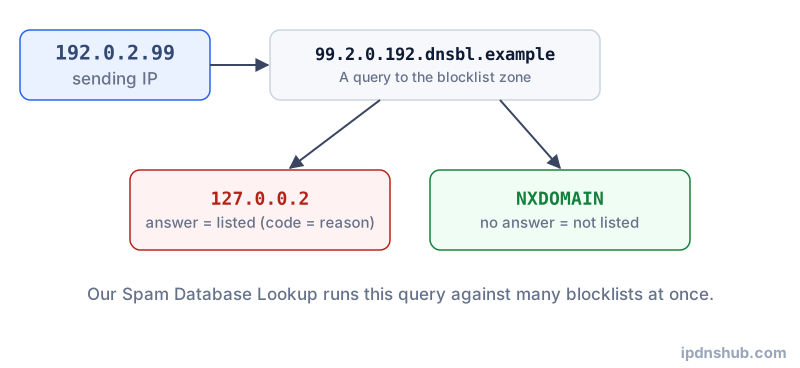
The query works by reversing the IP address octets and appending the list's domain name. For example, to check whether 192.0.2.1 is listed on zen.spamhaus.org, the mail server queries 1.2.0.192.zen.spamhaus.org. If the DNS query returns an A record (rather than NXDOMAIN), the IP is listed. The specific IP address returned encodes the listing reason — for example, Spamhaus uses different return codes to distinguish spam senders from exploited systems.
IP reputation is one of the most important factors in email deliverability. Even a single listing on a major RBL such as Spamhaus ZEN can cause your emails to be silently rejected by a significant percentage of recipient mail servers worldwide. Running regular blacklist checks is an essential part of mail server maintenance.
How It Works
DNS-Based Query Mechanism
The DNSBL query protocol leverages the existing DNS infrastructure for extremely fast, globally distributed lookups. A mail server receiving an inbound connection checks the sender's IP against multiple DNSBLs simultaneously using standard DNS queries. This process adds only milliseconds to the SMTP handshake — far faster than consulting a centralized HTTP API.
Listing Criteria
Each DNSBL operator defines its own listing criteria and policies. Some lists focus on direct spam senders identified through spam traps (email addresses that should never receive legitimate mail). Others list dynamic IP ranges typically assigned to residential broadband (which should not be sending email directly). Some lists rely on user-reported spam complaints, while others use automated detection of malware and botnet activity.
Return Codes and Subcategories
Advanced lists like Spamhaus ZEN combine multiple sub-lists and encode the reason for listing in the returned IP address. For example, a response of 127.0.0.2 indicates the SBL (spam source), while 127.0.0.10 indicates the PBL (policy block list for dynamic IPs). Parsing these codes helps diagnose the specific reason for listing.
Common Use Cases
Email Deliverability Diagnosis
When emails are being rejected or sent to spam folders, a blacklist check is the first diagnostic step. If your mail server's IP is listed on Spamhaus, Barracuda, or SpamCop, major email providers such as Gmail, Outlook, and Yahoo will reject or quarantine your messages. Identifying which lists you are on focuses your remediation effort.
Mail Server Pre-flight Checks
Before sending a large email campaign, marketing teams and email service providers routinely check the sending IP reputation across major RBLs. A clean IP is a prerequisite for high deliverability, alongside proper SPF, DKIM, and DMARC configuration and MX record alignment.
Shared Hosting and VPS IP Audits
On shared hosting and cloud VPS providers, IP addresses are frequently recycled from previous tenants. A newly provisioned server may inherit a blacklisted IP from a previous customer who sent spam. Checking before you begin sending email saves time and protects your sender reputation.
Major RBL/DNSBL Lists Reference
| List Name | Operator | Focus | Severity |
|---|---|---|---|
| Spamhaus ZEN | Spamhaus | Spam senders, exploited systems, policy blocks | Critical — blocks at most major providers |
| Spamhaus DBL | Spamhaus | Spam-associated domains (not IPs) | Critical — affects domain-based filtering |
| Barracuda BRBL | Barracuda Networks | IP reputation based on spam trap hits | High — widely used in enterprise gateways |
| SORBS DUHL | SORBS | Dynamic IP ranges (residential broadband) | Medium — blocks direct-to-MX from dynamic IPs |
| SpamCop | Cisco | User-reported spam sources | Medium — aggressive; listings expire quickly |
| URIBL | URIBL.com | URLs found in spam messages | High — affects URLs in email body, not sending IP |
| Invaluement | Invaluement | Private spam source intelligence | High — used by ISPs and corporate filters |
Frequently Asked Questions
Why is my IP blacklisted?
Common causes include: sending email from a compromised server or botnet-infected machine, hosting a spam domain or phishing page, having an open mail relay configuration, sending email to spam trap addresses, or receiving a significant volume of user spam complaints on messages you sent. Shared IP addresses can also become listed due to the behavior of other users on the same IP range.
How do I get my IP removed from a blacklist?
First, identify and remediate the root cause — remove malware, close open relays, review your sending practices. Then visit each blacklist operator's website and submit a delisting request. Most major lists such as Spamhaus and Barracuda have self-service removal portals. Some lists delist automatically after a period of inactivity; others require manual review. Do not request delisting until the underlying issue is resolved, or you will be relisted quickly.
Which blacklists do major email providers use?
Gmail, Microsoft 365 (Outlook/Hotmail), and Yahoo Mail each maintain proprietary internal reputation systems in addition to consulting external lists. Spamhaus is universally consulted at major providers. Barracuda, SORBS, and SpamCop are widely used by enterprise mail gateways and ISP mail servers. Getting clean on Spamhaus ZEN resolves the majority of deliverability problems.
Can a shared hosting IP affect my email?
Yes. On shared hosting, all customers on the same server typically share the same outbound IP address. If another customer's script or account is compromised and sends spam, the IP can be listed — affecting every domain on that server. This is one of the primary reasons to use a dedicated IP or a reputable transactional email service (such as SendGrid, Mailgun, or Amazon SES) for sending important email, rather than your web server directly.
How long does it take to get delisted?
Timelines vary by list. SpamCop listings expire automatically within 24 hours of no new spam reports. Spamhaus manual removals typically process within 24 hours of a request once the issue is verified resolved. Barracuda offers a self-service removal form with near-immediate processing. Some smaller or more aggressive lists may take several days or require demonstrated behavior change over a monitoring period before removing a listing.
Conclusion and Takeaways
Spam blacklist checking is a quick, essential diagnostic step for anyone running a mail server or troubleshooting email deliverability issues. Understanding which RBL and DNSBL lists are authoritative, what triggers a listing, and how to properly request delisting puts you in control of your IP reputation and mail server health. Combined with correct SPF, DKIM, and DMARC configuration, maintaining a clean blacklist status is the foundation of reliable email delivery.
Ready to Check?
Use the Spam Database Lookup tool above — no login required, instant results.