Article Summary: This article explains what a reverse IP lookup is, how shared and dedicated IP addresses work, the implications of shared hosting for SEO and security, and when reverse IP lookup is practically useful. It also describes how first-party DNS databases are built and answers common questions about the tool's accuracy and legality.
What Is Reverse IP Lookup?
A reverse IP lookup is the process of finding all domain names associated with a given IP address — the inverse of a standard DNS lookup, which resolves a domain name to an IP. While a forward DNS query asks "what IP does this domain point to?", a reverse IP lookup asks "what domains point to this IP?"
This is distinct from reverse DNS (rDNS), which maps an IP to a single PTR record (typically the hostname of the server itself). Reverse IP lookup instead queries a database of observed A-record pairings — domain-to-IP mappings that have been recorded over time from real DNS queries. The result is a list of IP neighbors: every domain currently (or recently) hosted on the same server.
The technique is widely used in network forensics, competitive research, SEO auditing, and abuse investigation. Understanding who shares a server with you — or who a suspicious domain shares a server with — can reveal important operational and security context.
How It Works
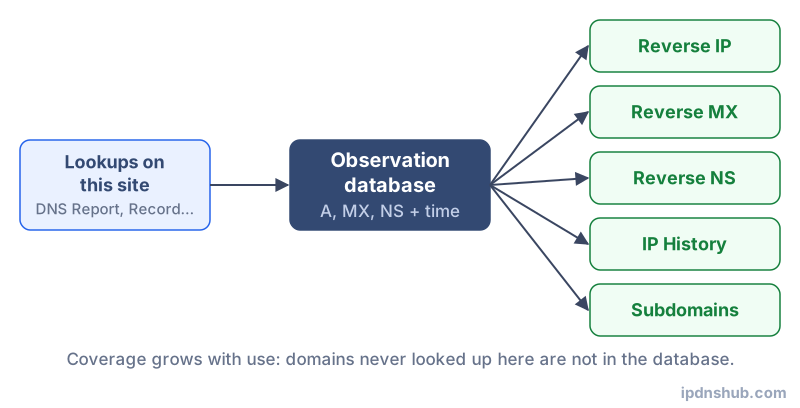
First-Party DNS Observation Database
Unlike services that rely on third-party data brokers, this tool uses a first-party DNS database built from DNS queries made on IP DNS Hub. Every time a domain is queried through any tool on this site, its resolved A-record IP address is recorded alongside the domain name. Over time, this builds a continuously updated map of domain-to-IP relationships that reflects current hosting arrangements rather than stale archived data.
This approach means the database grows organically — popular domains appear quickly, while obscure domains may not appear until they are queried for the first time. It also means results are based on real DNS resolution rather than inferred or purchased data, making them more accurate for current hosting state.
How the Lookup Executes
When you enter a domain or IP address, the tool first resolves the input to a canonical IP (if a domain was provided), then queries the internal database for all domains that have been observed resolving to that same IP. Results are returned in the order they were recorded, with the most recently observed domains appearing with recency context.
Common Use Cases
SEO and Hosting Research
SEO professionals use reverse IP lookup to identify which other sites share a server with a target domain. A shared hosting environment with hundreds of low-quality or spammy domains on the same IP can, in some cases, create negative neighborhood signals. While Google has stated that IP-based penalties are rare, mail server IP reputation is directly impacted by co-tenants — if a spammer shares your IP, your email deliverability may suffer.
Security and Abuse Investigation
Security researchers and incident responders use reverse IP lookup as part of server fingerprinting — mapping all domains hosted on a suspicious IP to understand the breadth of an attack infrastructure or phishing campaign. A single malicious IP that hosts dozens of look-alike domains is a strong indicator of coordinated fraud.
Competitive Intelligence
Discovering that a competitor's domain shares a server with a portfolio of related sites can reveal organizational structure, subsidiary relationships, or multi-brand strategies that are not publicly disclosed.
Infrastructure Verification
Developers and sysadmins use reverse IP lookup to verify that a domain migration has completed correctly — confirming the old IP no longer resolves for the domain, and that the new IP is correctly associated in DNS.
Technical Reference
| Aspect | Dedicated IP | Shared IP |
|---|---|---|
| Cost | Higher (add-on or VPS/dedicated server) | Included in shared hosting plans |
| Number of sites | One (or a small controlled set) | Dozens to hundreds of domains |
| SEO risk | None from IP neighborhood | Low but non-zero if co-tenants are spammy |
| Email reputation | Isolated — only your sending behavior matters | Shared — co-tenant spam can affect IP reputation |
| Security isolation | High — no shared processes or file systems | Lower — vulnerabilities in one site can affect others |
| Typical use case | E-commerce, high-traffic, transactional email | Personal sites, small blogs, low-traffic projects |
Frequently Asked Questions
What is a reverse IP lookup?
A reverse IP lookup queries a DNS observation database to find all domain names that currently or recently resolved to a specific IP address. It is the inverse of a standard DNS A-record lookup and reveals the "neighbors" of any given domain on a shared server.
Does sharing an IP address affect my SEO?
For organic search rankings, the direct impact of a shared IP address is minimal — Google evaluates domains individually and does not apply IP-block penalties in typical shared hosting scenarios. However, email deliverability is more sensitive: if your outbound mail server IP is on a shared host with active spammers, your IP may appear on real-time blocklists (RBLs), causing legitimate email to be rejected or quarantined.
How does the reverse IP database work?
The database is built from DNS A-record observations made when domains are queried through IP DNS Hub tools. Each time a domain's IP is resolved, the pairing is stored. This creates a growing, first-party dataset of domain-to-IP mappings that reflects real-world DNS state rather than inferred or purchased data.
Why does my IP show no domains?
If no domains are returned for an IP, it means none of the domains hosted on that IP have been queried through IP DNS Hub yet. The database is built organically — run a DNS Report or DNS lookup for any domain on that server to add it to the database. Results will appear on subsequent reverse IP lookups.
Is reverse IP lookup legal?
Yes. Reverse IP lookup queries publicly observable DNS data — specifically, which domain names resolve to which IP addresses. This information is technically public by nature (anyone can perform a DNS query). No private data, personal information, or access-controlled systems are involved. The technique is routinely used by security researchers, network engineers, and SEO professionals worldwide.
Conclusion and Takeaways
Reverse IP lookup is a deceptively simple tool with a wide range of practical applications — from understanding your hosting environment to investigating suspicious infrastructure. By revealing the co-hosted domains on any given IP, it provides context that a standard DNS lookup cannot. Whether you are auditing a domain for SEO risk, investigating an abuse report, or verifying a server migration, reverse IP lookup gives you a fast, no-login answer from real DNS observation data.
Ready to Check?
Use Reverse IP Lookup above — no login required, instant results.