Article Summary: This article explains what DNS propagation is, why different locations see different DNS results during a change, how TTL affects propagation speed, and what to do when propagation appears stuck. It also covers practical strategies for minimizing propagation delays before planned DNS changes.
What Is DNS Propagation?
Every time you change a DNS record — whether you are pointing your domain to a new web server, switching email providers, or updating a verification TXT record — that change must spread from your authoritative nameserver out to the thousands of recursive resolvers that internet users rely on to look up domain names. This spreading process is called DNS propagation.
Unlike a database update that takes effect instantly everywhere, DNS is a distributed, hierarchical, and heavily cached system. Resolvers operated by Cloudflare (1.1.1.1), Google (8.8.8.8), Quad9 (9.9.9.9), internet service providers, and corporate networks all maintain their own caches of recently queried records. They will not fetch a fresh copy of your record until their cached copy's TTL expires. This is by design — caching is what makes the global DNS system scale to billions of queries per second — but it means that your change will not be visible everywhere at the same moment.
How It Works
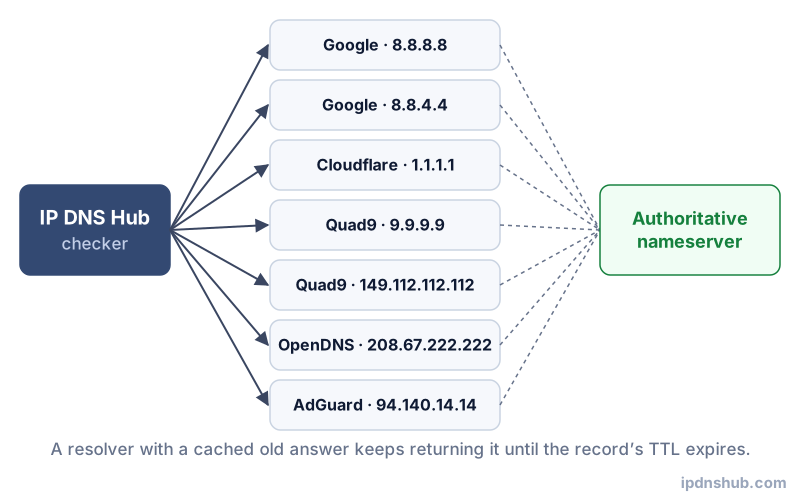
The Role of TTL in Propagation Speed
The single most important factor in how quickly your DNS change propagates is the TTL (Time to Live) that was set on the record before you made the change. If your A record had a TTL of 86400 seconds (24 hours) when you updated it, every resolver that cached the old value is permitted to keep serving that old value for up to 24 hours before it fetches the new one. Conversely, if you had pre-reduced the TTL to 300 seconds (5 minutes) several hours before making the change, the old value would be evicted from caches within 5 minutes and your new IP would be visible almost immediately.
Why Different Resolvers See Different Results
During the propagation window, it is entirely normal for different resolvers to return different values for the same domain. A resolver that recently cached your record will continue returning the old IP until its TTL expires. A resolver that has not cached the record yet, or whose cache just expired, will fetch the new value from your authoritative nameserver and return the updated IP. This is why a website change that works perfectly from your office may still appear broken for colleagues in another city or country — they may be hitting a resolver that has not yet picked up the new record.
How the Propagation Checker Works
This tool simultaneously queries your domain's A record against 7 major global DNS resolvers and compares the results. If all resolvers return the same IP address, propagation is complete. If some resolvers return the old IP while others return the new one, propagation is still in progress. The tool shows you each resolver's name, IP address, and the A record value it is currently returning, giving you a global snapshot of propagation status without needing to coordinate with contacts in different countries.
Common Use Cases
Confirming a Server Migration Is Complete
After Changing Your A Record to a New Hosting Provider
When you migrate a website from one server or cloud provider to another, changing the A record to point to the new IP is the final step. However, users will continue landing on the old server until their resolver's cache expires. Checking propagation lets you know exactly when it is safe to decommission the old server — if any major resolver still returns the old IP, some users are still being directed there.
Verifying a Domain Transfer or Nameserver Change
After Switching DNS Hosting Providers
Changing a domain's NS records to point to a new DNS hosting provider (such as moving from GoDaddy to Cloudflare) is a broader change than updating a single record. The new NS records must propagate before any subsequent record changes take effect. Checking propagation after an NS change confirms that the new authoritative nameservers are being recognized worldwide before you configure new records on the new platform.
Troubleshooting Intermittent Errors During Migration
When Some Users Experience Problems and Others Do Not
If users in some regions are unable to access your site or experiencing errors while others are not, mid-propagation DNS discrepancy is a likely cause. Running a propagation check immediately shows which resolvers are still serving the old IP address, helping you quantify the scope of the issue and communicate an accurate timeline to affected users.
Technical Reference
| Resolver Name | IP Address | Provider | Region |
|---|---|---|---|
| Google Public DNS | 8.8.8.8 / 8.8.4.4 | Google LLC | Global anycast |
| Cloudflare DNS | 1.1.1.1 / 1.0.0.1 | Cloudflare, Inc. | Global anycast |
| Quad9 | 9.9.9.9 / 149.112.112.112 | Quad9 Foundation | Global anycast, privacy-focused |
| OpenDNS | 208.67.222.222 / 208.67.220.220 | Cisco OpenDNS | Global anycast |
| AdGuard DNS | 94.140.14.14 / 94.140.15.15 | AdGuard Software Ltd. | Europe / Global anycast |
| Comodo DNS | 8.26.56.26 / 8.20.247.20 | Comodo Group | United States |
| CleanBrowsing | 185.228.168.9 / 185.228.169.9 | CleanBrowsing | Global anycast, family-safe filtering |
Frequently Asked Questions
How long does DNS propagation take?
DNS propagation time depends almost entirely on the TTL value that was set on the record before the change was made. If the TTL was 300 seconds (5 minutes), propagation to most resolvers will complete within 5-15 minutes. If the TTL was 86400 seconds (24 hours), propagation can take up to 24-48 hours. The common claim that propagation always takes "24 to 48 hours" is outdated and reflects worst-case scenarios with high TTLs — with a properly pre-reduced TTL, propagation to most major resolvers completes within minutes.
Why do different locations see different DNS results?
Because DNS is a distributed, cached system. Each recursive resolver maintains its own independent cache. A resolver that cached your record 23 hours ago (against a 24-hour TTL) will continue serving the old value for another hour. A resolver that has not seen your domain recently will query the authoritative nameserver and get the new value immediately. This per-resolver, per-TTL caching behavior is what creates the uneven propagation window where some users see the new record while others do not.
What is TTL and why does it matter for propagation?
TTL (Time to Live) is the number of seconds a resolver is allowed to cache a DNS record. It is set by the zone owner and applies to each individual record. A low TTL (60-300 seconds) means the record is refreshed frequently and changes propagate fast, but it also increases the number of queries sent to your authoritative nameserver. A high TTL (3600-86400 seconds) reduces query load but slows propagation. The best practice is to lower the TTL to 300 seconds at least one TTL-duration before a planned DNS change, then raise it back afterward.
My DNS change propagated but email stopped working — why?
This usually indicates that while your A record propagated successfully, one or more email-related DNS records were not updated or were accidentally broken during the migration. Check your MX records to confirm they still point to the correct mail server. Also verify that your SPF TXT record includes the new server's IP or sending domain — if you moved to a new mail provider, the old SPF record may no longer be valid, causing messages to fail authentication and be rejected or sent to spam. Use the DNS Record Lookup tool to inspect all relevant records.
Conclusion and Takeaways
DNS propagation is an unavoidable reality of how the Domain Name System works, but it does not have to be a black box. By understanding the role of TTL, pre-reducing it before planned changes, and using this DNS Propagation Checker to monitor rollout across 7 major global resolvers, you can manage DNS changes with precision and confidence. Whether you are migrating a high-traffic website, switching DNS hosting providers, or just verifying that a record update took effect, real-time propagation data is the tool you need.
Ready to Check Your DNS Propagation?
Use the DNS Propagation Checker above — no login required, instant results across 7 global resolvers.