Article Summary: This article explains what reverse DNS is, how PTR records work in the in-addr.arpa zone, why rDNS matters for email deliverability and server reputation, and what forward-confirmed reverse DNS (FCrDNS) means. It also covers practical scenarios where reverse DNS lookup is essential for network administrators and security professionals.
What Is Reverse DNS Lookup?
The standard DNS system resolves domain names to IP addresses — this is called a forward DNS lookup. A reverse DNS lookup does the opposite: given an IP address, it returns the hostname associated with that address. The answer comes from a special type of DNS record called a PTR record (Pointer record), stored in specially formatted zones under the in-addr.arpa domain for IPv4 addresses and the ip6.arpa domain for IPv6 addresses.
For example, to look up the hostname for the IP address 8.8.8.8, the DNS system queries the name 8.8.8.8.in-addr.arpa for a PTR record. The response — dns.google — is the hostname Google has assigned to that IP. This lookup mechanism is defined in RFC 1035 and has been a core part of the internet infrastructure for decades.
How It Works
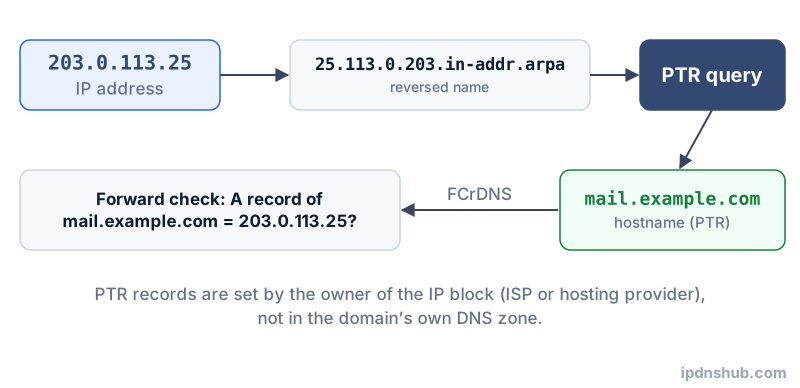
The in-addr.arpa Zone Structure
For IPv4, the address octets are reversed and appended with .in-addr.arpa to form the query name. The IP 192.0.2.1 becomes the DNS query 1.2.0.192.in-addr.arpa. This reversal is necessary because DNS names are read from most-specific (leftmost) to least-specific (rightmost), but IP addresses are written from most-significant to least-significant octet. Reversing the octets aligns the IP structure with the DNS hierarchy, allowing IP address blocks to be delegated and managed in the same hierarchical way as domain names.
Who Controls PTR Records?
Unlike forward DNS records, which are controlled by the domain owner, PTR records are controlled by whoever owns the IP address block. IP address blocks are allocated by regional internet registries (ARIN, RIPE NCC, APNIC, etc.) to ISPs and hosting providers, who in turn may delegate PTR management to their customers. This means that to set a PTR record for your server's IP address, you must request it from your hosting provider or ISP — you cannot set it yourself through your domain registrar's DNS panel.
IPv6 Reverse DNS
IPv6 reverse DNS works the same way as IPv4 but uses the ip6.arpa zone and requires fully expanding the IPv6 address and reversing each nibble (hexadecimal digit). For example, the IPv6 address 2001:db8::1 would be expanded, reversed, and queried as a long string under ip6.arpa. Due to the complexity and the vast number of possible IPv6 addresses, PTR record coverage for IPv6 is much sparser than for IPv4.
Common Use Cases
Email Deliverability and Mail Server Reputation
Why Mail Servers Check rDNS
The most critical practical application of reverse DNS is email deliverability. When a mail server receives an incoming connection from an SMTP server, one of its first checks is whether the connecting IP has a valid PTR record. Mail servers at major providers including Gmail, Microsoft 365, and Yahoo Mail will either reject or heavily penalize email from IP addresses that have no PTR record, or whose PTR record does not match the server's advertised hostname in the SMTP EHLO/HELO command. A properly configured PTR record is effectively a prerequisite for getting email delivered reliably from your own mail server.
Network Security and Logging
Making Log Files Human-Readable
Web server logs, firewall logs, and intrusion detection systems record connecting IP addresses. Reverse DNS lookup enriches these logs by adding human-readable hostnames, making it far easier to identify whether a connection originated from a legitimate cloud provider, a corporate network, or a suspicious residential or datacenter IP range. Security teams routinely use reverse DNS during incident response to quickly characterize the source of unusual traffic.
Spam and Abuse Detection
Identifying Suspicious Sending Infrastructure
IP addresses used by legitimate mail servers almost always have meaningful PTR records that match their sending domain. Spam and phishing operations frequently use IP addresses with no PTR record, or with generic PTR records (such as a bare IP or an ISP-assigned residential hostname). Email security tools, spam filters, and blocklist services use the presence and format of PTR records as a strong signal of a sender's legitimacy.
Technical Reference
| Aspect | Forward DNS | Reverse DNS |
|---|---|---|
| Query Input | Domain name (e.g., example.com) | IP address (e.g., 93.184.216.34) |
| Query Output | IP address or other resource data | Hostname (FQDN) |
| Record Type | A, AAAA, MX, CNAME, TXT, etc. | PTR |
| DNS Zone | example.com zone | in-addr.arpa (IPv4) or ip6.arpa (IPv6) |
| Primary Use Case | Resolving websites, mail servers, services | Validating server identity, mail reputation, logging |
| Who Manages It | Domain owner (via DNS hosting provider) | IP block owner (hosting provider or ISP) |
Frequently Asked Questions
What is a PTR record?
A PTR record (Pointer record) is the DNS record type used for reverse DNS lookups. It maps an IP address to a hostname. PTR records live in the in-addr.arpa zone (for IPv4) or ip6.arpa zone (for IPv6), not in the domain's own zone. They are set by the owner of the IP address block, which is typically a hosting provider or ISP. A PTR record does not affect how your domain name resolves — it only affects what hostname is returned when someone looks up your IP address.
Why does reverse DNS matter for email servers?
Receiving mail servers use reverse DNS as a basic authenticity check. When a connection arrives from an SMTP server, the receiving server checks whether the sender's IP has a valid PTR record and whether that PTR record's hostname matches or is consistent with the domain in the SMTP EHLO command. An IP with no PTR record or a mismatched one is a strong spam indicator. Without a proper PTR record, your outgoing email is very likely to be rejected by Gmail, Outlook, Yahoo, and most corporate mail gateways. Setting up rDNS correctly is as important as configuring SPF and DKIM for reliable email delivery.
Why does my IP have no reverse DNS?
If a reverse DNS lookup returns no result, it means no PTR record has been configured for that IP address. This is common for IP addresses that have recently been assigned, have not been configured by the hosting provider, or belong to residential ISP blocks that do not set PTR records for individual customers. To configure a PTR record, you must contact the organization that assigned you the IP address — your hosting provider or ISP — and request that they add or update the PTR record for your IP. Most cloud providers (AWS, DigitalOcean, Hetzner, etc.) allow customers to set PTR records through their control panel.
What is forward-confirmed reverse DNS (FCrDNS)?
Forward-confirmed reverse DNS (FCrDNS), sometimes called full-circle reverse DNS, is a two-step validation: first, the IP address is resolved to a hostname via PTR record (reverse DNS); then, that hostname is resolved back to an IP address via an A record (forward DNS). If both steps return consistent results — the PTR hostname resolves forward to the same IP — the IP is said to be forward-confirmed. FCrDNS is a stronger authenticity signal than PTR alone because it requires consistency across two separately managed DNS zones. Many mail servers and spam filters require or strongly prefer FCrDNS for accepting email.
Conclusion and Takeaways
Reverse DNS lookup is a fundamental tool for network administrators, email engineers, and security professionals. Whether you are diagnosing an email deliverability problem, auditing your server's identity configuration, or enriching security logs with human-readable hostnames, understanding and correctly configuring PTR records is essential. The Reverse DNS Lookup tool gives you instant rDNS results for any IP address, with no command-line tools required. Use it to verify your own servers, investigate unknown IPs, or troubleshoot email reputation issues.
Ready to Perform a Reverse DNS Lookup?
Use the Reverse DNS Lookup tool above — no login required, instant PTR record results.