Article Summary: This page explains what our SSL checker tests, how to read each field in the result, which problems cause browser warnings and how to fix them, and how to run the same check from the command line with OpenSSL.
What This Tool Checks
When you enter a domain, our server resolves it, opens a TCP connection to port 443 and performs a TLS handshake using the domain name as the Server Name Indication (SNI), exactly like a browser would. It then reads the certificate the server sends and tries to build a chain from that certificate to a root certificate it trusts. Problems are reported instead of stopping the check, so you can also inspect expired, self-signed or mismatched certificates.
Because the test runs from an external server, it shows what visitors on the public internet receive, not what is cached in your browser. Results are cached for five minutes; if you have just installed a new certificate, wait a few minutes and check again.
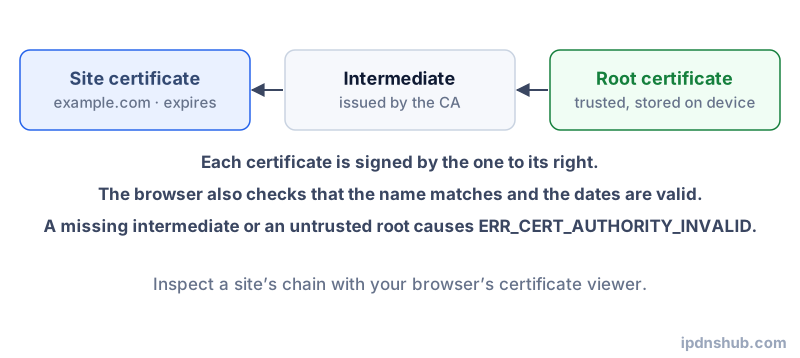
How to Read the Result
| Field | What it means |
|---|---|
| Issued to | The main name on the certificate. Browsers actually check the Names covered (SAN) list, so that row matters more. |
| Issued by | The certificate authority (CA) or intermediate that signed it, such as Let’s Encrypt, DigiCert or Sectigo. |
| Expires / days left | Public certificates are short-lived; renew well before expiry. Under 14 days is shown as a warning. |
| Names covered (SAN) | Every hostname the certificate is valid for. *.example.com covers one level of subdomains but not example.com itself. |
| Key and signature | ECDSA 256-bit or RSA 2048-bit keys and SHA-256 signatures are today’s normal choices. |
| TLS version | TLS 1.3 or TLS 1.2 is expected. Older versions are disabled in current browsers. |
| Certificate chain | The path from the site certificate through intermediates to a root. A missing intermediate breaks trust on some devices. |
Common Problems and Fixes
Expired certificate
Browsers show NET::ERR_CERT_DATE_INVALID. Renew the certificate and make sure the web server has been reloaded so it serves the new file. With automated renewal, check that the renewal job actually runs and that port 80 or the DNS challenge is reachable for the certificate authority.
Name mismatch
The certificate does not list the hostname you visited, typically www versus the bare domain, or a subdomain added later. Browsers show NET::ERR_CERT_COMMON_NAME_INVALID. Reissue the certificate with every hostname you serve, and on shared hosting make sure the site is bound to its own certificate rather than the server default.
Incomplete chain
The server sends only the site certificate without the intermediate. Desktop browsers sometimes fill the gap from their cache, so the site looks fine for you while phones and API clients fail. Configure the server with the full chain file (often fullchain.pem).
Self-signed certificate
Fine for internal test servers and device admin pages, but public visitors get NET::ERR_CERT_AUTHORITY_INVALID. Use a certificate from a public CA; free ones are available from Let’s Encrypt and others.
Behind a CDN
If the site uses a CDN or proxy such as Cloudflare, this tool sees the certificate served by the CDN edge, not the one on your origin server. The origin certificate only secures the connection between the CDN and your server. To check that one, test the origin directly from the command line below, connecting to its IP address with the correct server name.
Frequently Asked Questions
How do I check when an SSL certificate expires?
Enter the domain above and look at the Expires row and the days-left badge. From a terminal, openssl s_client piped into openssl x509 -noout -dates shows the same dates.
Why does my site work in my browser but the checker reports a chain problem?
Your browser may have cached the missing intermediate certificate from another site. Other devices, especially phones, command-line tools and payment or webhook clients, will still fail. Serving the full chain fixes it for everyone.
Does this tool check ports other than 443?
No. It checks the standard HTTPS port only. For mail servers and other services, use the OpenSSL commands with the relevant port, for example -starttls smtp on port 587.
Is my domain stored?
The result is kept in memory for five minutes so repeated checks do not load the target server. It is not saved to a database.
Ready to Test?
Use the SSL Certificate Checker above. No login required, instant results.